Managed Hosting
running a delivered application in production
The application we delivered keeps running in production, with backups whose restore is demonstrated at activation, monitoring that raises an alert before the client does, and a signed data processing agreement. Operating the application stays separate from building it.
- Area
- Security & infrastructure
Problem
An application that has been delivered still needs somewhere to run, backups someone verifies, monitoring someone watches, and a legal frame for the personal data it holds. That is a different job from the implementation, and a different job again from answering questions about how the application is used. Left implicit, it becomes nobody’s job — until the day a restore is needed and nobody has ever tested one.
Situations this serves:
- Operating a delivered app
- Client-owned infrastructure
Who it’s for
For clients of any Squad4.Digital product or custom solution, whatever service line it came from, who need the delivered application operated in production. It works both for clients who do not want to run infrastructure at all and for clients who run their own — internal policies, data sovereignty requirements, an in-house IT team — and want specialised operational help on the application itself.
Not for: anyone looking for functional support on how to use the application (a separate service, defined per product); anyone wanting development, implementation, configuration or modification of the application; anyone wanting an infrastructure service unattached to a Squad4.Digital product or solution.
Capabilities
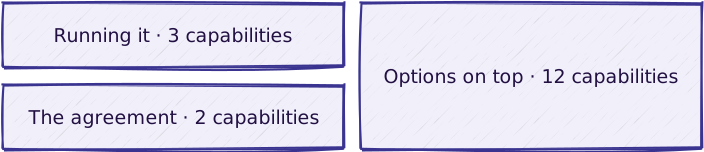
Running it
| Capability | What it does |
|---|---|
| Hosting | The production environment provisioned and the application installed in it at activation; capacity, resources and any additional environments sized per instance from the questionnaire and fixed in the operating agreement |
| Backups | Run at the agreed frequency and kept for the agreed retention, with a restore test demonstrated at activation, not merely a backup job that reports success |
| Monitoring | Application availability and environment health, with alerting inside the agreed coverage window; parameters and thresholds fixed in the operating agreement from the questionnaire |
The agreement
| Capability | What it does |
|---|---|
| Data processing agreement | Included with every instance; we operate the environment as data processor, and the client stays responsible for its data and for its authorised users |
| Recurring reporting | Its content and frequency fixed in the operating agreement |
Options on top
| Capability | What it does |
|---|---|
| Extended backup retention | Retention beyond the agreed standard, including retention imposed by law |
| Additional environments | Staging or pre-production alongside production |
| Extended monitoring | Background jobs, integrations, disk space, certificate expiry |
| Alert routing | Alerts to the client’s own channels and on-call rota |
| Private-network or VPN connectivity | Towards the client’s systems |
| Migration at activation | From other infrastructure |
Anything beyond the agreed parameters is scoped individually from the questionnaire below. Alert routing presupposes the monitoring it routes, so it is scoped only once the monitoring scope is settled. Retention beyond the agreed standard is bounded by the backup frequency — a longer history cannot be finer-grained than the backups that produce it. In the client-infrastructure variant, every capability is limited by what the client’s environment actually offers.
What is included in a given delivery, and how it is delivered: configuration vs. custom · delivery approach.
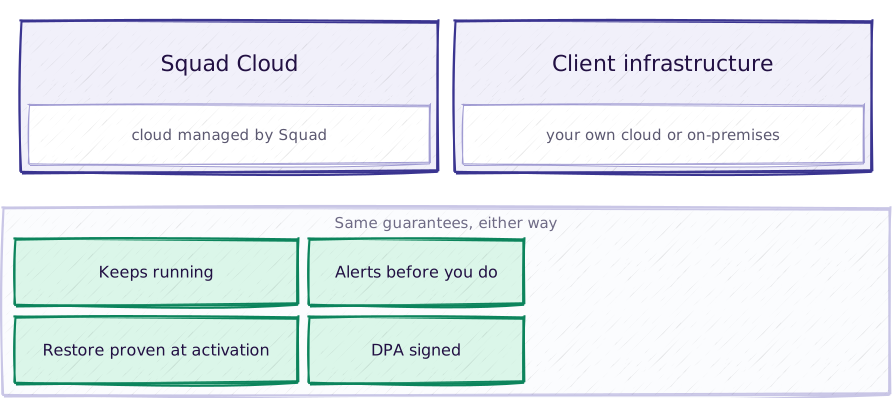
Two variants of the same service, differing only in who owns the infrastructure.
| Module | Squad Cloud | Client infrastructure |
|---|---|---|
| Where it runs | cloud managed by Squad | the client’s own cloud or on-premises environment |
| Who owns the infrastructure | Squad | the client — hardware, network, operating system, virtualisation, perimeter security, licences, and their cost |
| What we do | provision and operate the production environment, backups, monitoring, DPA | install and hand over the application, then assisted operations: backups, monitoring, agreed maintenance within the granted access |
| Restore test at activation | yes | yes |
| DPA | included at every level | signed where assisted operation involves Squad accessing data; the extent of access is fixed in the operating agreement |
Every instance fixes the same parameters in its operating agreement, from the questionnaire below: the availability target, measured monthly, with planned maintenance announced in advance excluded from the measurement; backup frequency and retention; the restore objective; resilience — a standard environment or cross-zone replication; and the operational coverage window. The same parameters apply to both variants; in the client-infrastructure variant they apply to the operations Squad assists with, they assume an infrastructure that meets what was agreed, cross-zone replication is provided by the client, and downtime of the client’s own infrastructure is excluded from the availability measurement.
What the questionnaire asks
Every instance is scoped individually, and it starts from the questionnaire. The completed questionnaire is annexed to the operating agreement.
- Availability — what hours, days and seasonality the application is used in; what the impact of one hour or one business day of downtime is; whether there are acceptable maintenance windows.
- Backup and restore — what the maximum acceptable data loss is (target RPO); how fast the service must be back after an incident (target RTO); what backup retention is required.
- Monitoring — what needs watching beyond availability (background jobs, integrations, disk space, certificates); who receives alerts on the client side, and through which channel.
- Data location — whether there are data residency (country/EU) or sovereignty requirements; whether there is personal data, or special categories of it, that impose additional conditions in the DPA.
- Integrations — which external systems talk to the application (ERP, e-mail, APIs, SSO) and who administers them; whether there are private-network or VPN dependencies towards the client’s systems.
- Constraints — compliance or audit requirements (ISO, GDPR, internal policies); access constraints, meaning who is allowed on the environment and through which approval procedure; for the client-infrastructure variant, a description of the infrastructure, versions, limitations and the responsible technical contact; estimated volumes — users, data, anticipated growth.
Not included
- Functional support — a separate service, defined per product. This service does not answer questions about how the application is used.
- Development, implementation, configuration or modification of the application.
- Migration from other infrastructure — handled separately, at activation.
- In the client-infrastructure variant: operating the client’s infrastructure (hardware, network, operating system, virtualisation, perimeter security), and any guarantee of its availability.
- Anything not explicitly listed in scope.
Reference workflow

Read the steps
- Questionnaire — completed before anything else; it covers availability, backup and restore, monitoring, data location, integrations and constraints.
- Parameter recommendation — a recommended value for each parameter with the reasoning behind it, written down before activation.
- Activation and provisioning — the environment is provisioned and the application installed; in the client-infrastructure variant, installed on the client’s infrastructure against the documented minimum environment requirements, with the operating configuration handed over.
- Restore test demonstrated — a backup is restored and shown to work, as part of activation.
- Monitoring and alerting live — monitoring active, thresholds set, and the alerting matrix agreed with the named recipients on the client side.
- Ongoing operation — backups at the level’s frequency and retention, monitoring, and agreed maintenance in agreed windows.
- Incident handling — environment incidents notified and handled within the coverage window of the contracted level, following the agreed procedure.
Reference architecture

What runs where, and on which stack, is fixed per instance in the operating agreement, from the questionnaire.
Integrations

What the service touches, rather than what it builds:
| System | Direction | What moves |
|---|---|---|
| Client identity, VPN or private network | both | As agreed — authentication and the access needed to operate the application within the client’s systems |
| Client alert channels | out | Alerts to the named recipients through the agreed channels |
| Client infrastructure | both | Client-infrastructure variant — access to the client’s hypervisor, network, operating system and related operating paths |
Security and ownership
- We operate the environment as data processor. The client remains the controller of its data and responsible for administering the application’s authorised users.
- A DPA is included at all levels in the Squad Cloud variant, and signed in the client-infrastructure variant wherever assisted operation involves access to data. It is signed before real data goes into production.
- Access to the environment is governed by the agreed procedure: who is allowed on the environment, and how access is approved. In the client-infrastructure variant, access is granted and maintained by the client; unannounced revocation suspends the affected obligations.
- We keep the record of sub-processors as applicable law requires.
See the security baseline. We claim no certifications.
Does one of these look like your operation?
Start with the diagnostic. We map how your work actually flows, then adapt the blueprint to it.