Device fulfilment
serialised devices from order file to invoiced parcel
An order file arrives from the ordering client; devices leave as personalised, packed, labelled, shipped, tracked and invoiced parcels; every step in between is a recorded state that can be audited and, when needed, undone. The platform runs the operator’s back office and warehouse work to get from the first to the second. The ordering client follows its parcels, corrects addresses and handles undeliverable parcels in its own portal. The operator’s staff work from screens that show the next task and nothing else. The invoice for the service is computed from the same records as the operation.

- Best for
- Logistics
- Area
- Operations
Problem
A fulfilment operator prepares physical devices on behalf of an ordering client and ships them to that client’s customers. Each device must be ordered, matched to a physical unit, personalised with the customer’s data, labelled, packed with the right paperwork, shipped, tracked, sometimes returned, and invoiced. This is simple to describe and hard to run:
- Several device types, several manufacturers, several sets of rules: different file formats, different labels, different processing steps.
- Delivery addresses in several countries, with different postal formats and countries that cannot be shipped to; a wrong address is a wasted device and a parcel that comes back much later.
- Several organisations in one process: the client orders, the manufacturers deliver stock, the operator prepares, carriers ship, and the client’s customer service answers the phone. Everyone needs the same status.
- Deadlines with agreed service levels per country, for personalisation and for delivery.
- Money follows the work: preparation, cartons, shipping by weight and zone, surcharges and customs fees have to be invoiced correctly for every parcel.
Who it’s for
It fits an operator that moves serialised physical items through several organisations, deadlines and paperwork on behalf of one or more ordering clients: devices arrive from manufacturers, are personalised per end customer at workstations, and leave as tracked parcels. It fits best where several device types share one floor, where the ordering client has its own departments and its own customer service, and where the client is willing to correct its own data in a portal instead of by e-mail.
It does not fit a company looking for warehouse staff or a carrier service: what is delivered here is the operating software. It does not fit an operation without serialised items or without a per-item processing step — plain parcel shipping is a carrier’s business, not this platform’s. It is not an off-the-shelf product: it is the reference shape of one delivered platform, adapted per implementation.
Capabilities
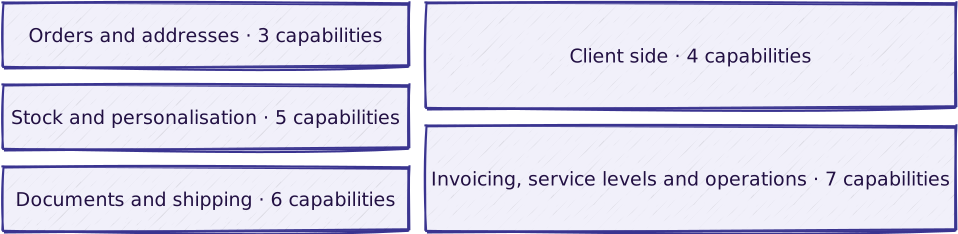
Orders and addresses
| Capability | What it does |
|---|---|
| Order intake from files | Order files collected from a file server on a schedule, parsed per device type, and turned into orders, parcels and device lines; a failed file is reported at once, and a waiting file raises an alert |
| Address validation and client-side correction | Every delivery address checked against a postal reference database with country-specific rules and a list of countries that cannot be shipped to; the client corrects bad addresses in its own portal and processing resumes on its own |
| Another destination country | Postal rules, an unshippable flag, and its own agreed delivery delay |
Stock and personalisation
| Capability | What it does |
|---|---|
| Inbound stock by serial number | Stock registered from the manufacturers’ delivery-note files, checked for counts and duplicate serial numbers, and tracked per unit — deliveries, pallets, stock items — by serial number and state |
| Workstation personalisation on tablets | The operator scans in, picks a workstation, takes the next parcel, scans and personalises each device and checks its labels one by one; a device is marked done only when every check passes |
| Two-phase device association | For device types that need it, the physical unit is first associated to the order line by serial number and personalised later; documents are regenerated when every unit in the parcel is done |
| Another device or product type | Its own file parser, labels, workstation type and processing states on the same backbone |
| Another manufacturer’s delivery-note format | A parser for the inbound stock file, with the same count and duplicate checks |
Documents and shipping
| Capability | What it does |
|---|---|
| Parcel documents and labels from editable templates | Transport label, accompanying letter, invoice, delivery note and stock file generated at the right step from templates maintained per document type, department, language and device flow, without a developer |
| Carrier labels, handoff and tracking | Transport labels generated in the carrier’s format, parcels handed over, and tracking data ingested back per parcel |
| Public tracking page | A parcel’s carrier status, reachable by its reference without a login |
| Undeliverable parcels, returns and recycling | Handled by the client’s own team from the parcel’s page — re-send or recycle — and processed on the operator side as structured work; returned and recycled parcels are formal states |
| Another carrier | A transport-label format and a tracking-file parser |
| Own document templates and languages | Letters, invoices and delivery notes per department, language and flow |
Client side
| Capability | What it does |
|---|---|
| Client portal | Parcel tracking, exports, support tickets, statistics, and the client’s own users, roles and letter templates |
| External REST API | A versioned interface for the client’s systems: devices, parcels, addresses, stock and undeliverable parcels |
| Support ticketing synchronised between the two sides | Tickets raised by the client’s team and answered on the operator side, through a ticketing engine integrated into both portals |
| Own systems | Order files in and documents or stock files out on a file server, or the REST API |
Invoicing, service levels and operations
| Capability | What it does |
|---|---|
| Service invoicing runs | Per period: completed parcels selected, fees computed from dated price grids, zones, taxes and surcharges; an estimate and a report reviewed before confirmation |
| Own fee rules | Price grids, zones, weight bands, taxes, surcharges and per-device extras, dated |
| Service-level monitoring and KPI export | Personalisation and delivery measured against the agreed service level per country, with drill-down and export |
| Own service levels | Personalisation and delivery targets per country, business-day calendar and holidays |
| Stock and consumption files for an external ERP | Stock-consumption files produced for the client’s ERP in the agreed format |
| Audit trail and state rollback | Every step a recorded state transition with author and moment; an administrator can step a parcel back to an earlier state, and the step back is itself recorded |
| Administration and configuration | Device types, carriers, countries, templates, price grids, users and workstations, managed by the operator’s administrators |
Dependencies: re-sending an undeliverable parcel needs carrier label generation; the delivery service level needs the carrier’s tracking data; the client editing its own templates needs the client portal; an invoicing run needs products, zones, carriers and price grids configured first.
What is included in a given delivery, and how it is delivered: configuration vs. custom · delivery approach.
Not included
- Warehouse staffing or carrier services. What is delivered is operating software, not a physical fulfilment or transport service.
- The devices, the personalisation equipment and the manufacturer contracts. The platform tracks and drives them; it does not supply them.
- Carrier contracts and tariffs. These stay between the operator and the carrier.
- The accounting system. The invoicing run computes the service and produces reports; fiscal issuance and bookkeeping happen outside.
- The ERP that consumes the stock files. The platform produces the files; what is done with them downstream is the client’s.
- The ticketing engine. A third-party component, integrated rather than built.
- Production operation and the data-processing agreement. Who operates the platform, and who signs as data processor, is set in the delivery agreement; where we operate it, that is contracted through Managed Hosting.
- Strict validation of every scanned barcode format. Scans are checked by the workflow — the right parcel, the right device, every label — not by a format rule per barcode type. Stricter input validation is scoped where a device type needs it.
- A postal reference dataset, and a subscription to one. Address validation runs against the platform’s own loaded reference data, not against an external validation provider. The data has to be brought and kept current for every country in the footprint; sourcing and licensing it is not part of the platform.
Reference workflow

Read the steps
The journey of one device, as the delivered platform runs it. Exceptions are named where they occur.
- Order file. The ordering client drops an order file on the file server. The platform collects it on a schedule, parses it with the parser for that device type, and creates the order, its parcels and its device lines. Exception: a file that fails to parse is moved to an error folder and an error e-mail goes out; a file waiting too long raises an alert. While an import is running, processing transitions are held back so that a half-loaded order is never worked on.
- Address. Every delivery address is validated against the postal reference database: country, city and postal-code range, with country-specific rules. Exception: a parcel with a bad address does not block the rest of the order; it waits in a correction state visible to the client in the portal, the client corrects it in a form with autocomplete, and processing resumes on its own. A country on the unshippable list is refused.
- Inbound stock. An administrator registers an expected delivery and picks the manufacturer’s delivery-note file. The platform checks pallet and unit counts and duplicate serial numbers, then creates pallets and stock items, each with a serial number and a state. Exception: a mismatch against the file is reported and the delivery is not accepted.
- Personalisation. An operator scans in on a tablet, selects a workstation and sees that workstation’s queue only. They take the next parcel, scan and personalise each device, and check its labels one by one; the device is marked personalised only when every check passes. Exception: a rejected unit goes to a trash-stock file; a unit that fails a firmware or hardware upgrade is flagged and written to an invalidated-stock file. Variant: for device types that need it, the physical unit is first associated to the order line by serial number and personalised later; documents are regenerated automatically when every unit in the parcel is done.
- Documents. The parcel’s documents are generated in sequence — transport label, accompanying letter, invoice, delivery note, stock file — from the template for that document type, department, language and flow, and transferred to the partner file server. Each document has its own lifecycle: generated, transferred, regenerated, regenerated for a re-shipment.
- Carrier. The parcel is handed to the carrier. Tracking files are ingested by scheduled agents and shown per parcel in the portal and on the public tracking page.
- Delivered, or not. The parcel is delivered, or the carrier reports it undeliverable. Exception: the client’s team requests a re-send or a recycling from the parcel’s page; the operator side processes it, transport labels are regenerated, and the answer appears live in the portal. Returned and recycled are formal states with their own view.
- Invoicing. An administrator opens an invoicing run for a period. The platform selects the completed parcels and computes each one’s preparation fee per device type, carton fee, shipping by zone, carrier and weight band from the dated price grids, country taxes and non-EU customs fees, the carrier’s fuel surcharge for the period, and per-device extras. An estimate is shown, a first report per ordering entity is generated for review, the administrator confirms, and a final aggregated report is produced. Exception: a failed run can be retried.
Every step above is a state transition recorded with who did it and when. An administrator can step a parcel back to an earlier state to recover from an error, and the rollback is itself recorded.
Reference architecture
Technology-neutral shape of the solution:

The two sides have separate user models and screens. They are connected through an event bus and a read-only data connection. Workstation isolation — a tablet user only sees the parcels of the workstation they selected — is enforced by the API, not by the screen.
Implementation stack of the delivered platform: PHP services on Laravel with a GraphQL API, RabbitMQ, MySQL and Redis; Vue and React browser applications; containerised and deployed through a CI pipeline.
Integrations

What the platform connects to, in which direction, and what moves:
| System | Direction | What moves |
|---|---|---|
| Order files | in | The ordering client’s files on a file server, one format per device type |
| Manufacturer delivery notes | in | One file format per manufacturer, creating pallets and serial-numbered stock |
| Address reference data | in | A postal database of countries, cities and postal-code ranges, loaded from a reference file |
| Carriers | both | Transport labels in the carrier’s format go out; tracking files come in on a schedule |
| Documents and stock files | out | Generated documents go to a partner file server; stock-consumption files include a variant for an external ERP |
| Personalisation equipment | both | For one device type, personalisation files are exchanged with an external machine |
| REST API | out | Versioned, token-based, rate-limited data about devices, parcels, addresses, stock and undeliverable parcels |
Anything outside this set — another carrier, another manufacturer format, an ERP connection in either direction, a customs or payment system — is scoped after discovery and contracted separately.
Security and ownership
- Two isolated sides. The operator side and the client side have separate authentication and separate databases; the client side works on a read-only copy of the data and sends corrections and requests back as events.
- Authentication per surface. Password-based login with tokens for the dashboards, personal tokens and a scanned label code for the tablets, one-time codes for client password resets, token-based access with rate limits for the external API, temporary links for downloads. Services authenticate each other with a signed, daily-rotating key.
- Roles and isolation on the server. Role-based permissions on both sides; a tablet user is limited by the API to the workstation they selected; the client’s administrators manage their own users, roles and languages, with a context per department.
- Audit trail. Every state change on every order, parcel, device, document, delivery, pallet, stock item, workstation task and invoicing run is recorded with the actor and a snapshot; a rollback is recorded like any other transition.
- Personal data. End customers’ names and addresses pass through the platform. A scheduled job cleans sensitive data from completed parcels. The public tracking page is reachable without a login by anyone holding a parcel’s reference; what it shows beyond the carrier status is a personal-data decision taken at implementation. The retention rule, deletion governance and the data-processing agreement between operator and ordering client are set in the delivery agreement.
The common baseline is documented once: security baseline. No certification is claimed for this solution. Who owns and operates the platform in production is set in the delivery agreement.
Does one of these look like your operation?
Start with the diagnostic. We map how your work actually flows, then adapt the blueprint to it.