University website
one public site, many faculties, one admissions season
Each faculty publishes its own pages, the admissions office publishes its own season, and nobody waits for the web team. One public website for an entire university — the institution, every faculty, every research centre, the senate, the alumni community and the admissions campaign — where the people who own the content maintain their own part of it without going through IT, and where a prospective student can find a study programme, read the admission rules for it, and leave their details in the same visit.
The admissions season is the part that has a deadline. The site is built so that a new session, its places on offer, its rules and later its results can be prepared, previewed and published by the admissions office itself, on the day it decides to publish.

- Best for
- Education
- Area
- Customer experience
Problem
A university’s website is not one website. It is thirty of them, owned by people who do not report to each other: each faculty has its own announcements, its own study programmes, its own timetables and exam documents; each research centre has projects and calls; the senate publishes decisions; the admissions office runs a campaign that changes every year and must be exact. When all of that goes through one web team, two things follow — the content is always late, and the web team spends the year copying PDFs into pages.
The recognisable symptoms in a sales conversation: documents e-mailed to a webmaster to be uploaded; faculty pages that were last accurate two years ago; an admissions offer that exists as a spreadsheet and is retyped into the site; prospective students who phone because they cannot find the rules for the programme they want; and no list of the people who expressed interest, because interest arrives as unstructured e-mail.
Who it’s for
For a public institution with many semi-autonomous internal entities and a content problem rather than a transaction problem: a university, an institute, a hospital group, a county administration. It fits when the institution has a communications team able to structure content but no capacity to be the bottleneck for every faculty and department, and when the yearly admissions or enrolment campaign is a hard commitment with a published calendar.
It fits when editors are non-technical: everything the site shows is edited in an administrative interface with entity-scoped access, not in files.
It is not for:
- a single-entity organisation with a handful of pages — the delegated-permission machinery is the whole point and would be pure overhead;
- an institution that needs a full application and enrolment system — this captures expressions of interest and publishes results, it does not score candidates, rank them, allocate places or handle fees (see Not included);
- a multi-site or multi-brand setup expected to run several institutions from one installation — the implementation is shaped for one institution per deployment;
- a fully bilingual public site where both languages are one deployment: today the second language is a separate site.
Capabilities
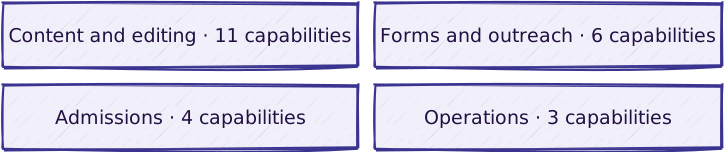
Content and editing
| Capability | What it does |
|---|---|
| Section structure and navigation per entity | The institution’s whole public surface in one place — university root, faculties, research centres, administrative structures, senate, alumni and admissions — each mounted as its own section with its own navigation |
| Page builder with show/hide sections and preview | A page is an ordered list of sections, each of which can be shown or hidden without deleting it: text, media, galleries, portfolios, counters, icon boxes, documents, FAQ, tabs, toggles, testimonials, calendar, contact, newsletter and CTA blocks; pages, admissions sessions and results have a preview URL that renders the unpublished state |
| Delegated editorial access, scoped per entity | A faculty editor sees and edits their own faculty’s content and nothing else, enforced at object level in the admin, not by convention |
| Shared document library with upload limits | Every document type in the system inherits one document object with title, description, download-button label and an upload-size ceiling configured per environment |
| Announcements, events and categories, per entity | News, announcements and events with the same objects reused for the university, senate, faculties, centres, structures and alumni, and an iCal feed for events |
| Site-wide search with filters | Search over everything published, with category, date-range and sort filters, updated as content is saved |
| People, leadership, commissions and contact registers | Registers of people, leadership, commissions and contacts, per entity |
| Reports, legislation and methodology registers | Registers of reports, legislation and methodologies, published as documents |
| Editor-tunable site settings | Logos, favicon, calls to action, cookie notice, error-page copy, list lengths, default images and display variants, all editable in the admin without a deploy |
| SEO metadata, sitemap and internal-link management | Page metadata, a sitemap and managed internal links |
| Second public language in the same deployment | A second public language served from the same site, with a language switch |
Admissions
| Capability | What it does |
|---|---|
| Study-programme catalogue | Programmes per faculty with level, attendance mode, language of instruction, duration, credits, accreditation status, criteria and two independent visibility switches: visible on the site, and visible in the admissions panel |
| Admissions sessions, offer tables and criteria | Sessions per level (bachelor, master, doctorate), each with its offer categories, a configurable offer table, admission criteria, aptitude tests and their documents; activating a session automatically deactivates the previous one of the same level |
| Results publication and archive | Results per faculty category, admitted and rejected as text or attached document, released by a per-category publication switch, with an archive of previous sessions |
| Pre-registration capture and spreadsheet export | A prospective student picks one or more study programmes and leaves their contact details, education background and explicit consents; the office reads the list in the admin and exports it to a spreadsheet; submitted requests cannot be edited or deleted from the interface |
Forms and outreach
| Capability | What it does |
|---|---|
| Newsletter address capture | A newsletter sign-up form whose addresses the office exports |
| Outbound e-mail notification | The office, or the candidate, notified by e-mail when a form is submitted |
| Bot protection on public forms | Invisible challenge on submission, plus an image challenge available |
| Spreadsheet export on any register | Administrative export for registers beyond pre-registration |
| Social feed on the home page | A live feed pulled from the institution’s Instagram account |
| Virtual tour | A virtual tour embedded in the site |
Operations
| Capability | What it does |
|---|---|
| Product analytics | A self-hosted analytics endpoint proxied from the same domain |
| Error monitoring | Exception reporting to a hosted service |
| Managed operation of the delivered site | See Managed Hosting |
Dependencies worth knowing: the social feed and the analytics capability each need an account the institution owns, and its credential must be kept where ordinary editors cannot read it. Bot protection covers the pre-registration form and extends to other forms as configuration. Spreadsheet export is enabled per register.
What is included in a given delivery, and how it is delivered: configuration vs. custom · delivery approach.
Not included
- A candidate application and selection system. Scoring, ranking, place allocation, contracts and fees happen outside. This publishes the offer, captures interest and publishes the outcome.
- Any link to a student-information system. The list of interested candidates leaves as a spreadsheet, by hand.
- Payments. No tuition, no application fee, no gateway.
- Candidate accounts. A prospective student never logs in; there is no place to see one’s own submission, correct it, or withdraw it.
- Data-subject erasure and correction from the interface. The candidate register is read-only by design, so a request to correct or delete a record is currently a database operation.
- An editorial approval chain. An editor with access to an entity publishes; there is no four-eyes step, no scheduled publication and no draft/review state beyond the show/hide switch and the preview URL.
- Timetables, grades, course delivery, library systems. The site publishes documents about them.
Reference workflow

Read the steps
The reference flow is an admissions season, because it is the one with a deadline and the one that touches every other module.
- Trigger — the institution approves the offer for the coming season: which programmes run, on what terms, under which methodology.
- The catalogue is brought up to date. Faculty editors revise their study programmes and set the two visibility switches: on the public site, and in the admissions panel. A programme can be published on the site while still hidden from the campaign.
- The admissions office creates the session for a level (bachelor, master, doctorate), attaches the methodology documents, defines the offer categories, configures which columns the offer table shows, and records the admission criteria and any aptitude tests.
- Preview. The office opens the session’s preview URL and reads it as a candidate would, while it is still inactive.
- Activation. Marking the session active publishes it and automatically retires the previous active session at the same level — the site never shows two current sessions for one level.
- Candidates arrive. A prospective student browses the programme catalogue, opens a programme, follows the pre-registration call to action, selects one or more programmes, fills in their details, ticks the consents they agree to, and submits. The submission is validated against the programmes that are actually open to the campaign, then stored.
- The office works the list. Pre-registration requests are read in the admin, filtered and searched, and exported to a spreadsheet for whatever the office does next.
- Results. After the selection happens outside the system, the office attaches the admitted and rejected lists per faculty category, previews them, and flips the per-category publication switch.
- Outcome. The session and its results stay reachable as an archive when the next season opens.
Where it does not hold:
- A candidate submits for a programme that has been withdrawn from the campaign. The submission is rejected rather than half-stored: the server re-checks every selected programme against the visible set and refuses the whole request if any one of them fails.
- A candidate fails the bot check or leaves a required field empty. The form comes back rejected; no partial record is created.
- The office publishes early by mistake. Publication is per offer category, so the exposure is one category, and the switch is reversible — but there is no approval step between an editor’s intent and the public site, and the only record of the change is the administrative log.
- Two sessions are activated at the same level. This cannot persist: activation demotes the previous one on save.
- A submission needs to be corrected or withdrawn. It cannot be, from the interface — the pre-registration register is deliberately read-only, so corrections and erasure requests are a database operation, not a screen (see Not included).
Reference architecture
Technology-neutral first — this is the blueprint:
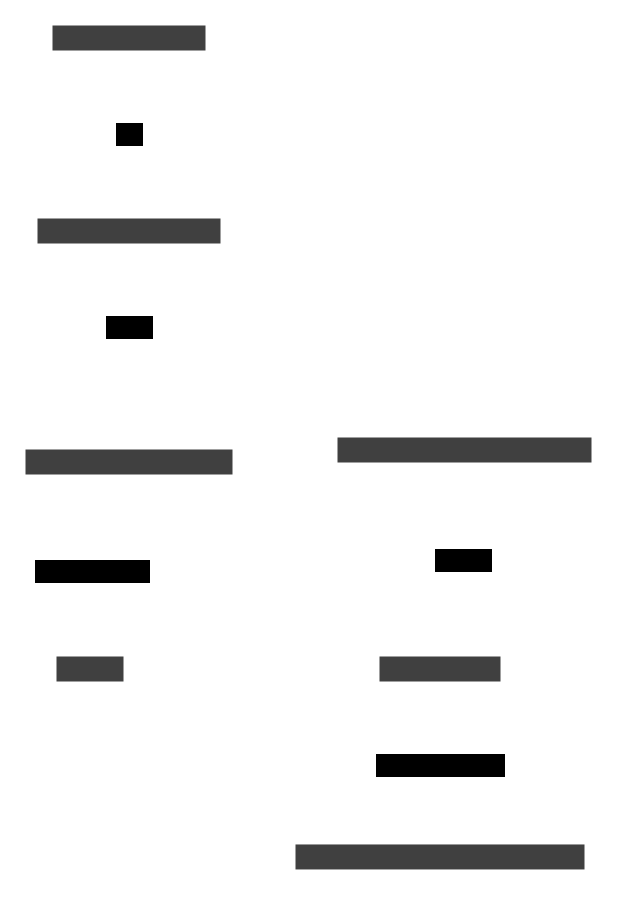
Four things are load-bearing in that picture, and they are what a second implementation would keep: one document object shared by every module; entity-scoped editorial access; a search index that follows the content store without an editor thinking about it; and a public form intake whose records are append-only.
Implementation stack of the delivered site: Django on Python with PostgreSQL; Solr for search; object-level permissions and runtime settings inside the Django admin, which is the editorial workspace; served natively behind nginx, with the admin reachable only from agreed network addresses. The containerised setup is for development only.
Integrations
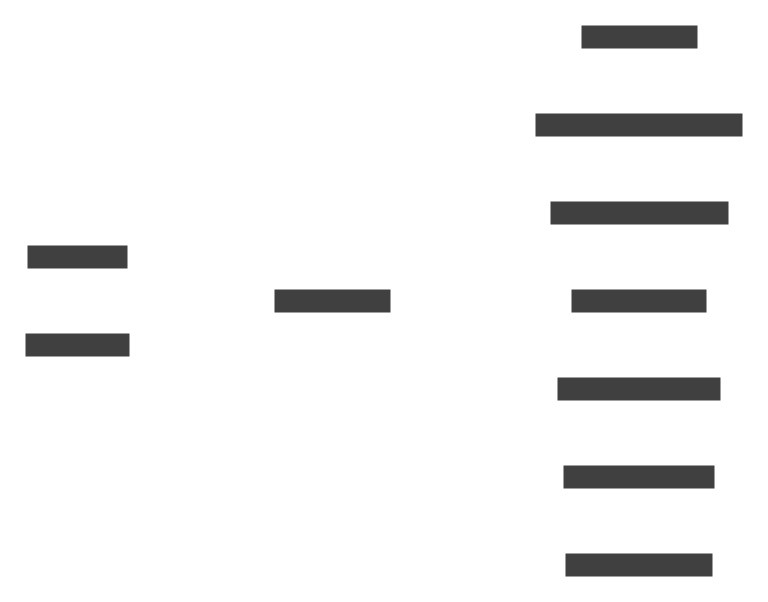
| System | Direction | What moves |
|---|---|---|
| Search index | out | Continuous — indexed content of everything published |
| Bot-protection service | out | Per submission — challenge verification for the pre-registration form |
| Spreadsheet export | out | On demand — pre-registration requests and newsletter addresses |
| Social feed | in | On request — recent posts of the institution’s own account |
| Outbound mail | out | Contact-form and alumni-form notifications |
| Map service | in | Per page — map key for location display |
| Product analytics | out | Usage events |
| Error monitoring | out | Exceptions |
| Runtime metrics | out | Request metrics from the application |
There is no integration with a student-information system, no payment integration and no identity provider. Every candidate-facing exchange ends in a spreadsheet handed to the office.
Security and ownership
Baseline: security-baseline. Specific to this blueprint:
- Editorial access is object-level, not role-level. A faculty, centre, structure, programme or commission is an object a user is granted access to; child content inherits the grant through its foreign-key chain. This is the mechanism that lets the institution decentralise editing without giving thirty people the run of the site.
- One institution per deployment. There is no tenant boundary in the data model — separation between institutions is separation of installations.
- The administrative interface is reachable only from agreed networks. Where the boundary is drawn, and who may change it, is settled at implementation.
- Login hardening is in place: repeated failed sign-ins lock the account, passwords are stored hashed and checked against strength rules.
- Personal data collected is minimal and consent-tracked. A pre-registration request holds name, contact details, age, place of residence, the year the school-leaving exam was passed, the programmes chosen, and three separate consent flags — processing, sharing with partners, and being contacted — each recorded as given or not given.
- The candidate register is append-only by design. Adding, changing and deleting are disabled in the interface; viewing and export remain. That is a good audit property and a bad erasure property: a correction or erasure request is handled as an administered data operation, not from a screen (see Not included).
- Nothing is deleted automatically. Candidate records, newsletter addresses and recorded messages are kept indefinitely until a retention rule is agreed and a scheduled deletion put in place; both are decided at implementation and documented for it.
- Audit covers who changed which object and when, through the administrative log. Publication decisions themselves are not separately audited.
- Ownership. The institution owns the code, the content, the uploaded files and the database. Backups, monitoring and their verification are an operating responsibility: assign them explicitly, or contract them through Managed Hosting.
Does one of these look like your operation?
Start with the diagnostic. We map how your work actually flows, then adapt the blueprint to it.