Production fulfilment
barcode checks from order to pack
A shop-floor platform that turns production orders into a guided sequence of workstation checks, document controls and packing confirmation. Operators see the next valid action, supervisors can see delays and exceptions, and each order reaches a controlled ready-for-handoff state only after its required production steps have been completed.

- Best for
- Manufacturing
- Logistics
- Area
- Operations
Problem
An order may be complete in the source system but still leave the shop floor to decide what to make, which materials and packaging to use, which documents to print and when the parcel is actually ready. The risk grows when standard, manual and finished-goods orders follow different paths, several workstations share the work, or unavailable stock and missed scans are discovered only at packing.
Who it’s for
This pattern fits a fulfilment or light-manufacturing operator that receives orders from another system, performs repeatable production and packing steps at identified workstations, and needs a controlled handoff back downstream. It assumes one operating organisation with shared workflow rules and central administration.
It is not a fit for a multi-merchant platform requiring tenant isolation, a carrier-management product, a returns platform, or a serialised-device personalisation service. It also does not replace the upstream order-management or enterprise resource planning system.
Capabilities
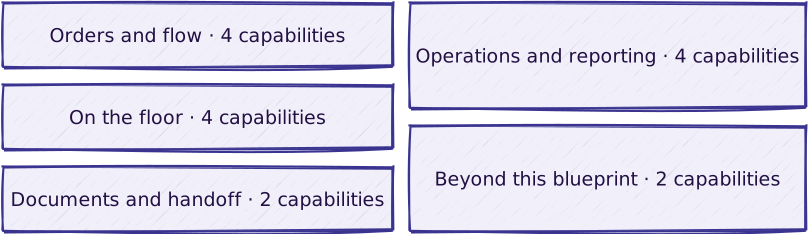
Orders and flow
| Capability | What it does |
|---|---|
| External production-order intake | Controlled intake of production orders, expected dates, reference data and supplied documents from an upstream system, including safe replay of the same order |
| State-driven standard production flow | A guided workflow with only valid next actions presented at each state |
| Manual pre-production flow | A manual-production path with generated internal labels and a pre-production bill-of-materials check |
| Finished-goods and mixed-order flows | Paths that bypass or combine selected production stages |
On the floor
| Capability | What it does |
|---|---|
| Operator sign-in and workstation assignment | Operator sign-in, workstation assignment and a role-appropriate starting view for the work available there |
| Barcode verification for products, packaging and mailers | Mismatches rejected and unavailable references blocked before work proceeds |
| Unavailable-stock blocking and workflow exceptions | An order stays out of the next state and an operational exception is raised when stock, reference lookup or document delivery fails |
| Real-time workstation updates | Order progress and operational exceptions pushed to the workstations as they happen |
Documents and handoff
| Capability | What it does |
|---|---|
| Packing confirmation and ready-for-downstream handoff | Packing start and completion controls tied to the workstation handling the order, followed by a ready-for-downstream handoff |
| Production-document control | Document routing, print confirmation, scan confirmation and reprint controls by workstation and order type |
Operations and reporting
| Capability | What it does |
|---|---|
| Administration and workstation configuration | Administrative views for orders, users, workstations, workflow settings and integration health |
| Transition logging with actor and context | Every workflow transition recorded with who acted and in what context |
| ERP stock-file exchange | Imports consumption records and returns reconciled production data to the enterprise resource planning system |
| Operational dashboards, exports and external logistics reporting | Workload, throughput and service-objective dashboards, downloadable order data and a scheduled external logistics report in the partner’s format |
Beyond this blueprint
| Capability | What it does |
|---|---|
| Serialised-device fulfilment | Device personalisation, carrier tracking, returns and service-fee invoicing — see Device fulfilment |
| Managed operation of the delivered platform | See Managed Hosting |
The order-type flows depend on an agreed state map and reliable classification from the upstream system. Document control depends on workstation routing and printer connectivity; stock and reporting exchanges depend on client-owned file contracts and secure transfer endpoints.
What is included in a given delivery, and how it is delivered: configuration vs. custom · delivery approach.
Not included
- A customer ordering portal, product catalogue, quotation flow or checkout; orders originate in another system.
- Serialised-device inventory, per-device personalisation, carrier tracking, returns processing or service-fee invoicing; those belong to the separate device-fulfilment blueprint where relevant.
- Carrier selection, label purchasing or parcel-event tracking. A shipping-label document can be supplied with an order, but the platform does not create a carrier shipment.
- Native generation of invoices, brochures, notices or other customer-facing business documents. The platform receives these files; it generates only operational labels.
- Multi-tenant merchant isolation, merchant self-service configuration or separate data domains within one deployment.
- Demand planning, procurement, warehouse replenishment or authoritative inventory accounting; the enterprise system remains the system of record.
- Physical workstations, scanners, printers, networking and on-site operational services.
- Lot-number scanning as an operator step; it was removed from the workflow and is not offered.
Reference workflow

Read the steps
- Order intake. The upstream system submits a production order with its type, expected date, required references and available documents. Repeating the same external order identifier returns the existing order rather than creating a duplicate.
- Sign-in. An operator signs in by code and registers on an available workstation. The workstation determines the relevant starting view and which production controls apply.
- Order selection. The operator selects or scans an order. The system validates its state, order type, workstation eligibility and stock availability before production begins.
- Manual pre-production. For a manual-production order, the operator confirms the required components before the main reconciliation flow. Finished-goods and mixed orders follow their configured variants.
- References and documents. The system obtains the reference details needed on the floor, routes required documents to the workstation and records print events. If reference lookup or document delivery fails, the order stays out of the next state and an operational exception is raised.
- Barcode checks. The operator scans the expected products, packaging and mailers. A wrong, duplicate or unavailable reference is rejected; the order advances only when the checks required for that order are complete.
- Packing and handoff. The operator starts packing at a workstation, completes it at the same workstation and marks the order ready for the downstream handoff. Repeated completion signals are handled safely.
- Supervision. Supervisors follow workload, late orders, throughput and exceptions. Optional exports pass production, stock or logistics data to the systems that own the next business step.
Reference architecture

The reference shape separates upstream order ownership, production-state control, workstation interaction, document routing and outbound reporting. Adapters isolate external reference lookup and file exchange so that a delivery can change providers without redefining the shop-floor workflow.
Implementation stack of the delivered platform: a Laravel API with GraphQL over a relational database, queue workers and event broadcasting; a React progressive web application for the workstations; an administration panel; object storage for documents; SOAP and file-transfer adapters.
Integrations
| System | Direction | What moves |
|---|---|---|
| Upstream order system | in | Order identifier, type, expected date, references, quantities and document metadata, over an authenticated interface |
| Upstream order system | both | Status queries and production/ready signals |
| Enterprise reference service | in | Lot and storage-location data from the enterprise system |
| Workstation printers | out | Production documents and generated operational labels over file transfer |
| Enterprise planning system | both | Inbound consumption files and outbound production and reconciliation records |
| Object storage | out | Supplied and generated documents for controlled download, export and later deletion |
| Logistics reporting partner | out | Optional scheduled operational-results file over secure transfer |
| Email recipients | out | Optional alerts for stalled intake, transfer-endpoint health and unavailable-stock exports |
There is no carrier-booking, parcel-tracking, payment or returns integration; those belong to the systems that own the next business step.
Security and ownership
The base security posture follows the shared security baseline.
The platform separates administrator and operator roles. Administrative mutations enforce role checks; workstation mutations restrict an operator to orders assigned to that workstation. Human sessions use revocable API tokens, while system-to-system routes use dedicated tokens and can restrict the caller’s network origin.
Workflow transitions record who acted and in what context, with a persistent transition history available as a configuration choice. Supplied documents are scheduled for deletion after an order reaches a terminal state, according to the configured retention rules. The model is single-organisation rather than tenant-isolated. Ownership of hosting, credentials, retention policy, public dashboard exposure and data-controller obligations is fixed in the delivery agreement.
Does one of these look like your operation?
Start with the diagnostic. We map how your work actually flows, then adapt the blueprint to it.