Quote-to-order portal
from request to paid order, in one place
A quote is built from prices that already exist, a job’s status is read off a board instead of asked for on the phone, and margin is visible while the job is still open — not at month end. The portal holds the whole path from a customer request to delivery and payment status in one place: the customer sends requests, approves quotes and artwork and follows their own orders; the team moves the job through numbered, stated, approved steps, each with a history. It replaces the spreadsheet, e-mail and phone routine of any supplier that quotes made-to-order work.

- Best for
- Manufacturing
- Distribution
- Area
- Sales operations
Problem
A supplier that works to order runs the whole path from customer request to delivery and payment on spreadsheets, e-mail and phone calls. Quotes are rebuilt from scratch, job status is found by walking into production, and real margin surfaces at month end — if it surfaces at all.
Situations this serves:
- Every quote gets rebuilt from scratch
- Customers call to ask where their job is
- We find out whether a job made money at month end
- Corporate clients order through their own approval chain
- Part of the work goes to subcontractors, and we lose sight of it
Who it’s for
It fits a supplier that works to order, has repeat customers, and runs a recognisable commercial flow: a request, a quote, an approval, a job that passes through production stages, a delivery, an invoice — print and production suppliers first, and any maker or distributor with the same shape. It fits best where several people touch the same job — commercial, prepress or engineering, production, invoicing — and where the customer side has someone who approves. Corporate clients with their own internal requesters and approvers, and work that is partly subcontracted, are served by the corporate-accounts and supplier capabilities.
It does not fit a shop whose work is walk-in and one-off, with no repeat customers and no approval step — there the flow costs more than it saves. It does not fit a supplier looking for a full ERP: the portal does not do stock and purchasing across the company, production planning and capacity, payroll, or fiscal issuance. It is not a replacement for an accounting system; it connects to one. It is also not an advanced web-to-print storefront, and it does not fit a supplier whose real problem is an online editor with variable data and complex personalisation.
Capabilities
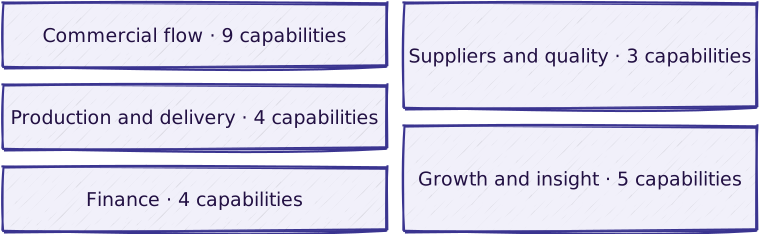
In print, the artwork approval step is the BAT and the production board is the press schedule; the capabilities below are the same for any made-to-order supplier.
Commercial flow
| Capability | What it does |
|---|---|
| Company accounts and roles | Customer accounts with requester, approver and view-only roles; internal roles for commercial, prepress and production |
| Request intake | The customer sends a structured request through the portal, or the commercial owner enters it; each request becomes one tracked job carrying status, owner and deadline through to payment |
| Catalogue and pricing rules | The products and specifications a request is checked against; per-product prices with quantity tiers and threshold discounts, or price grids and per-client price lists; a discount above the threshold needs internal approval |
| Quote, approval and revisions | A numbered quote with a validity period, approved by the customer’s decision role; a change request withdraws it and re-issuing produces a new revision with its own number; approval creates the order automatically |
| Direct re-ordering from an approved catalogue | A client user re-orders an approved item — same specification, approved artwork, negotiated price — without a new quote |
| Corporate accounts | Internal requesters, internal approval, departments, budgets and an approved catalogue per corporate customer |
| Agency accounts | One agency account organised by its end clients or brands — catalogue, artwork, addresses and jobs filtered and reported per brand, invoiced to the agency |
| Client status portal | Customers send requests, approve quotes and artwork, and see their own orders, deliveries and invoices |
| Product configurator and web-to-print channel | Guided options with validations and a generated preview; a self-service B2B or public channel over the catalogue and ordering |
Production and delivery
| Capability | What it does |
|---|---|
| Artwork and proof approval | Prepress uploads proof versions; the customer approves or rejects with a mandatory comment; every version is kept with its decision; annotations, version comparison and multiple approvers where needed |
| Brand library | Per-client brand assets, versioned, with preflight on file upload |
| Production board | The job’s production stages with validated transitions; a stage that requires an artefact cannot be entered without it |
| Delivery and logistics | Agreed and actual delivery date and address, a numbered delivery note; carriers, several shipments across locations, proof of receipt, consignment stock |
Finance
| Capability | What it does |
|---|---|
| Margin | Estimated against actual margin, visible while the job is still open |
| Invoicing and receivables | An invoice tied to the order — number, issue date, due date — tracked as issued, paid or overdue; fiscal issuance happens outside |
| Payments and credit control | Payment initiation and tracking, payment links, credit limits, due dates, overdue notices |
| e-Invoicing, accounting export and period close | Electronic documents issued and tracked from the invoices; partners, issued invoices and supplier invoices exported to the accounting system with a transfer log; open jobs at a reference date with committed but uninvoiced revenue and cost |
Suppliers and quality
| Capability | What it does |
|---|---|
| Suppliers and subcontracting | Supplier register, comparable quote requests, purchase orders, status and ratings |
| Supplier portal and invoice reconciliation | Each supplier sees only its own requests and orders, without sale prices or the end customer’s identity; supplier invoices recorded against the purchase order and reconciled with the accepted quote |
| Quality and claims | Non-conformities and claims per order, causes, actions (rework or credit note), traceability and statistics |
Growth and insight
| Capability | What it does |
|---|---|
| B2B onboarding and follow-up | A repeatable path from account request to first order — request with company data, validation by the supplier, time-limited invitation, activation — and lifecycle rules that trigger one message or one internal task per window, with opt-out |
| CRM and lead integration | Links leads to the client account and its orders, with source, campaign and owner where they exist; the portal does not become a CRM |
| Reporting and analytics | Standard reports on quote→order, production, customers and margin, with export |
| AI assistant | Conversational intake, suggestions from history, visual proposals; the human decision stays mandatory |
| Audit and history | A chronological history of every job’s flow events with author and moment |
Dependencies: any payment connector needs Payments and credit control first. The Supplier portal needs Suppliers and subcontracting. The web-to-print channel needs the Product configurator and the advanced proof approval. The AI assistant needs the brand library for visual proposals. Agency accounts build on company accounts and roles; CRM and lead integration links what arrives and generates no leads.
What is included in a given delivery, and how it is delivered: configuration vs. custom · delivery approach.
Not included
- Hosting, backup, monitoring, DPA — contracted separately, through Managed Hosting.
- Functional support — a separate service.
- Advanced web-to-print: online editor, dynamic templates, variable data, 3D, complex personalisation.
- Migration of data out of the previous system.
- Integrations with ERPs, proprietary formats, bidirectional connectors, or couriers and suppliers beyond the connectors listed under Integrations.
- Special invoicing or delivery rules, brand adaptations beyond standard portal configuration.
- Lead generation and marketing campaigns: onboarding and CRM organise the accounts that arrive; they do not bring firms to the form.
- Sub-portals, separate logins or independent branding for an agency’s end clients.
All of these are scoped individually after discovery and contracted through a statement of work or an annex. They are not implicit extensions of the capabilities above.
Reference workflow

Read the steps
The standard flow. Exceptions are named where they occur.
- Request. The customer sends a structured request through the portal, or the commercial owner enters it internally. The request creates or feeds a tracked job — the unit that carries status, owner and deadline from here on. Variant: a new B2B account can start before its first request — the firm applies through a public form, the supplier validates it or rejects it with a reason, and a time-limited, single-use invitation activates the account.
- Validation. The commercial or project owner checks the request against the catalogue: product type, technical specification, quantity, deadline. Anything the catalogue does not cover is settled here, before a quote exists.
- Quote. The quote is issued with a number and a validity period; the customer sees the values with VAT calculated. Line prices come from per-product prices and quantity tiers, or from price grids where they are in use. Exception: a manual discount below the configured threshold applies directly; above the threshold it requires internal approval, recorded with author, moment and value.
- Approval. The customer’s decision role approves the quote or requests changes with a mandatory comment; a view-only role on the customer side cannot decide. Exception: a change request withdraws the issued quote and is visible to the internal team; re-issuing produces a new revision with its own number.
- Order. Approval creates the order automatically, with an identifiable number and a system event. There is no separate direct-order path in the standard flow — an order without an approved quote is blocked. Variant: with direct re-ordering, a client user orders an item from the approved catalogue — same specification, approved artwork version, negotiated price within its validity — and the order is created with a number, without a new quote or proof; any deviation becomes a standard request.
- Artwork approval. Prepress uploads proof versions; the customer approves or rejects, with a mandatory comment on rejection. Exception: after a rejection a new version is uploaded and the cycle repeats; the history keeps every version with its decision, author, date and comment.
- Production. Production moves the job across stages on the board, with validated transitions: stages run forward, and a stage that requires an artefact — quote, order, proof, delivery, invoice — cannot be entered without it. Exception: an invalid move is blocked with the reason shown; invoiced or cancelled jobs are closed and no longer move.
- Delivery and payment status. The order carries the agreed date, the actual date and the address; a delivery note is generated automatically with an identifiable number. The invoice is tied to the order — number, issue date, due date — and its status is tracked operationally as issued, paid or overdue. Fiscal issuance happens outside the solution; electronic issuance and transmission, online payment, credit limits and overdue notices belong to the finance capabilities.
Every step above writes an event to the job’s history, with author and moment.
Reference architecture
Technology-neutral shape of the solution:

The application core enforces roles and permissions on the server, not in the browser, and writes the audit trail. External systems are reached only through the integration layer, so a delivery without any connector is a complete solution on its own.
Integrations

The solution connects outwards through standard, explicitly selectable connectors:
| System | Direction | What moves |
|---|---|---|
| Couriers | both | Shipment creation, label and tracking number, tracking and standard status updates on the solution’s deliveries |
| Payment providers | both | Redirect or checkout, signed webhooks and provider statuses translated into the solution’s common payment states |
| e-Invoicing | both | Issuing, transmitting and tracking electronic documents derived from the solution’s invoices |
| Accounting sync | out | Documents for the accounting system, including supplier invoices where supplier invoice reconciliation is active |
| CRM or lead source | both | Lead and account events — requested, approved, activated, first order — with source, campaign and owner where they exist |
| Messaging for account follow-up | out | One message per rule window to a contact, or one task to the internal owner, with opt-out |
Transport tariffs and SLAs stay between the client and the courier. Payments and credit control is required before payment-provider connectors, and the solution stores no card data. Each connector is set up in the implementation that needs it, for the providers and scenarios agreed there. Anything outside the set above — a new courier or supplier, an ERP, a proprietary format, a complex bidirectional integration, special invoicing or delivery rules — is scoped after discovery and contracted separately. It is not an implicit extension of a standard connector.
Security and ownership
- Roles and permissions on the server. Authentication with credentials and server-side sessions that expire per the agreed policy; protected routes redirect to authentication without a session. Authorisation is enforced on the server, including on direct URL access, and customer data is isolated per client in the portal.
- Audit trail. A chronological history of the job’s flow events with author and moment: request, quote, approval, order, proof, delivery, payment status, quote revisions and stage moves.
- Persistence and data integrity. All operational data is stored durably; nothing is lost on page reload or application restart. Referential integrity is maintained across the flow: an order references the approved quote it came from, an invoice references the order, proof versions reference the job — the links are neither lost nor orphaned.
- Account activation by invitation. With B2B onboarding, a requested account is validated by the supplier before any access exists; activation uses a time-limited, single-use invitation, re-issuing one invalidates the previous, and duplicate requests are refused by fiscal identifier or e-mail.
- Personal data. Portal users, contact details and the history attached to them are handled with GDPR in mind: access limited by role, deletion and export handled per the agreement reached at implementation. The specific data-protection agreement and the operating responsibilities are part of the hosting and operations contract, not of this blueprint.
The common baseline that applies to every Squad4 solution is documented once: security baseline. No certification is claimed for this solution.
Does one of these look like your operation?
Start with the diagnostic. We map how your work actually flows, then adapt the blueprint to it.